

How to Set Trimmer Zero Gap Safely
- Home
- Single Blog
How to Set Trimmer Zero Gap Safely
A trimmer that hits too soft will slow your lineup down. A trimmer that is set too aggressively will let you know fast – irritation, scratches, and a client who flinches the second you touch the edge. If you want to know how to set trimmer zero gap the right way, the goal is simple: get the blade as close as possible for sharper performance without turning it into a skin scraper.
Zero gapping is one of those adjustments that can upgrade a good trimmer into a detail machine, but only if you do it with control. This is not about making every trimmer as exposed as possible. It is about balance, blade alignment, and knowing how much aggression fits your hand, your clients, and the kind of work you do every day.
What zero gapping actually does
Zero gapping means adjusting the cutting blade so it sits extremely close to the stationary blade. When it is dialed in correctly, the trimmer cuts tighter, lines hit cleaner, and detail work feels more precise. That matters for lineups, beard outlines, neck cleanup, design work, and any area where a soft edge is not acceptable.
The trade-off is simple. The closer the blade, the sharper the hit. That usually improves performance, but it also raises the chances of irritation if the blade is misaligned or pushed too far. Some barbers want the hardest possible hit for crisp enhancements and dry detailing. Others need a slightly more forgiving setup for sensitive skin, kids, or clients who already react to close contact. Zero gap is not one fixed setting. It is a controlled range.
Before you set trimmer zero gap
Do not start by loosening screws and guessing. First, unplug the trimmer or remove the battery if the model allows it. Clean the blade area so you are not aligning through hair, oil sludge, or product buildup. A dirty blade can throw your view off and make a decent adjustment look bad.
You will usually need a small screwdriver that fits the blade screws properly. A poor fit can strip the screws and turn a quick tune-up into a replacement job. Good lighting matters too. If you cannot clearly see the relationship between the moving cutter and the stationary blade, you are working blind.
It also helps to know your blade type. Some trimmers are easier to zero gap than others. Some have tighter manufacturing tolerances and stay stable after adjustment. Others may shift slightly as you tighten them back down. That is why a careful hand beats speed every time.
How to set trimmer zero gap step by step
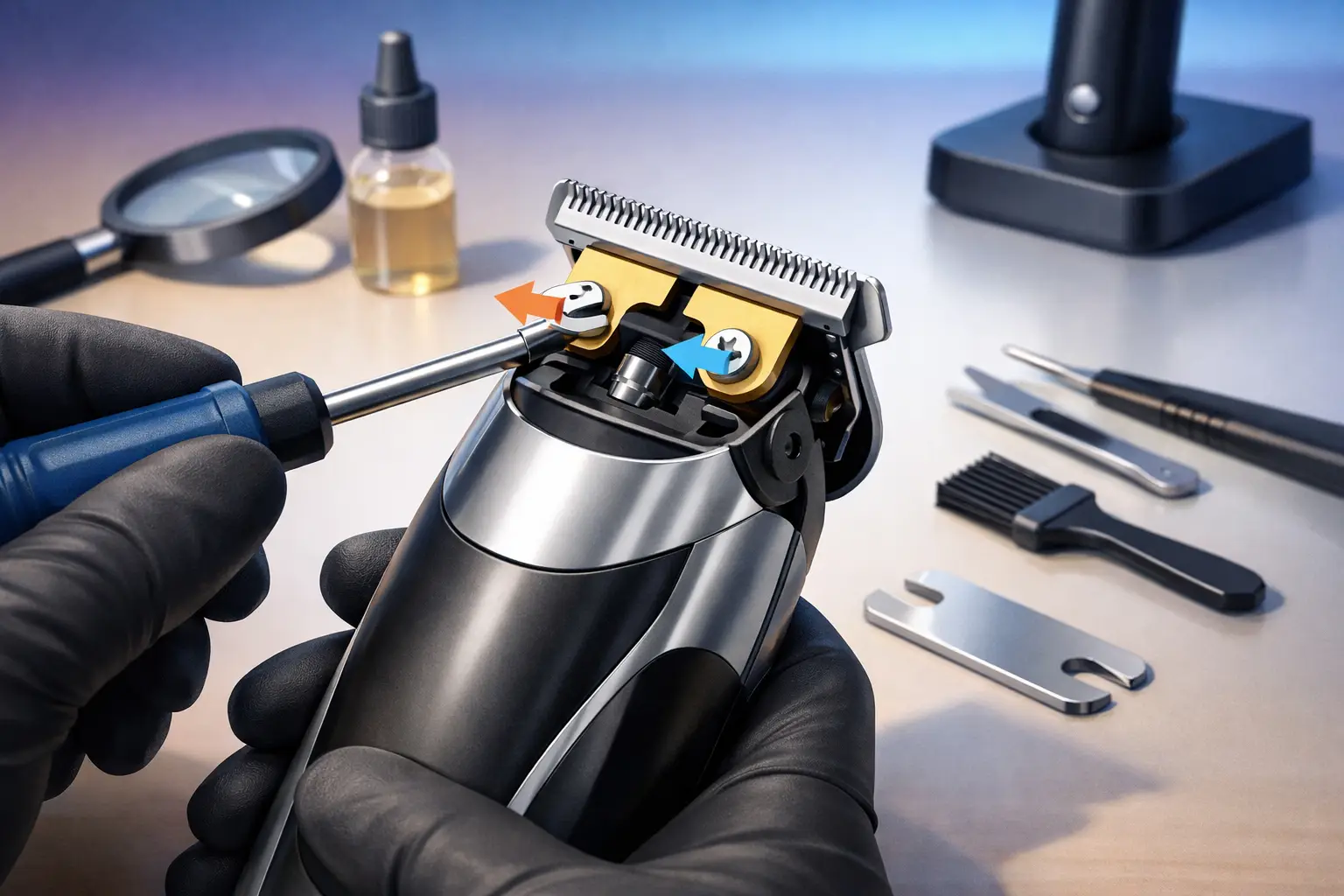
Start by loosening the two blade screws just enough for the blade to move. Do not remove them completely unless your trimmer design requires it. You want controlled movement, not a blade assembly falling apart on the station.
With the screws loosened, gently move the cutting blade upward until it sits very close to the edge of the stationary blade. The key point here is that the moving blade should not extend past the stationary blade. If it does, the trimmer becomes much more likely to nick skin.
A safe target is to leave the cutting blade just a hair behind the stationary blade. Barely behind is enough. You are looking for close exposure, not overexposure. Many barbers use their thumbnail or fingertip to hold the blade in place while tightening the screws little by little.
Tighten one screw partially, then the other. Check alignment again before fully locking them down. Blades often shift during tightening, especially on trimmers with a little play in the mounting system. Once both screws are secure, inspect the blade from straight on. Both sides should look even, and the cutter should sit parallel under the stationary blade.
That is the core of how to set trimmer zero gap. The rest is testing and fine-tuning.
How to check if the blade is set correctly
Turn the trimmer on and listen first. A healthy blade should sound normal for that machine. If it suddenly gets louder, rattles, or sounds strained, the blade may be too tight, misaligned, or not seated properly.
Next, test it on a controlled area. For professionals, that might mean using it lightly on your forearm or the back of the hand to feel the hit. For home users, the same applies, but stay cautious and use minimal pressure. You are not checking how much skin it can tear up. You are checking whether it cuts cleanly without biting.
If the blade feels sharp but smooth, you are in a good range. If it grabs, scratches, or feels like it is digging, back it off slightly. That small adjustment can make a major difference. One fraction of movement separates a crisp trimmer from an uncomfortable one.
Common mistakes that ruin a zero gap
The biggest mistake is pushing the moving blade past the stationary blade. That is not precision. That is a setup for cuts. The second mistake is assuming every trimmer should be zero gapped the same way. Motor strength, blade shape, and intended use all matter.
Another common issue is uneven alignment. One side may sit safely while the other side is exposed. That leads to strange performance where the trimmer feels fine at one angle and rough at another. Always inspect both corners before you call it done.
There is also the habit of adjusting dirty or damaged blades. If the blade is chipped, worn down, or packed with buildup, zero gapping will not fix weak performance. It may actually make the issue worse. Sharpness and cleanliness still matter.
When not to zero gap a trimmer
Not every setup needs to be pushed to the edge. If you do a lot of work on sensitive skin, inflamed areas, or clients prone to razor bumps, a slightly backed-off blade may serve you better. You still get clean lines, but with more forgiveness.
The same goes for new barbers or home users who are still developing pressure control. A heavily zero-gapped trimmer in untrained hands can create problems fast. Skill and setup should match. There is no reward for making your tool more aggressive than your technique can handle.
Some barbers also keep more than one trimmer setup. One hits tighter for sharp outlines and detailed finishing. Another stays slightly less aggressive for bulk client work or delicate areas. That is a smart system, especially in a busy shop where consistency matters more than ego.
Blade care after zero gapping
Once your trimmer is set right, maintenance keeps it performing that way. Clean the blade after use, especially if you are cutting through enhancement residue, beard product, or heavy buildup. Hair trapped between the blades affects both cutting performance and heat.
Use blade oil regularly, but do not flood the assembly. A few drops in the right spots are enough. Let the trimmer run briefly so the oil distributes evenly, then wipe off the excess. Too much oil attracts debris and turns clean mechanics into sludge.
You should also monitor blade heat during service. A close-set blade can feel hotter faster, especially during long sessions or repeated detail work. Heat does not always mean the zero gap is wrong, but it does mean you need awareness. Coolant, rotation between tools, and smart work habits all help.
Choosing the right zero-gap setting for your work
There is a reason experienced barbers talk about blade feel as much as blade closeness. The best zero gap is the one that gives you sharp execution with control. If your trimmer leaves clean lines, stays comfortable on skin, and holds up through daily use, you do not need to chase a more extreme setting.
For lineup specialists and detail-heavy barbers, a tighter zero gap may be worth it because every edge matters. For all-around shop work, a moderate zero gap often gives better consistency across different hair types and skin sensitivities. The right answer depends on your service mix and how your hand works.
That is also why barber-tested tools matter. Professional-grade trimmers and accessories from brands built around real shop performance, including Encore The Barber, are made for this kind of precision work. A good machine gives you a reliable platform. Your setup finishes the job.
Final check before it touches a client
Before you put any freshly adjusted trimmer on a client, test it again. Look at the blade from the front, check both corners, turn it on, and feel the hit lightly on yourself. That extra 30 seconds is worth more than rushing into a service with a blade you have not verified.
A zero-gapped trimmer should give you cleaner detail, not create more correction work. Set it with patience, back it off if it bites, and let performance tell you when it is right. Sharp tools matter, but controlled tools win in the chair every time.
Share This :
Search
Recent Post
How to Set Trimmer Zero Gap Safely
July 3, 2026
How to Sharpen Lineup Edges Cleanly
July 1, 2026
When to Replace Clipper Blades
June 29, 2026